
Found $1,400 in food cost mistakes — first week
My 'money maker' burger was costing me 42%. Repriced it, trimmed one ingredient, margin jumped to 31%. Paid for itself before the month was up.
Marcus T.
Smokestack BBQ · Tampa, FL
Sep 28, 2026
 1/10
1/10Recipes·All plans
Found $1,400 in food cost mistakes — first week“My 'money maker' burger was costing me 42%. Repriced it, trimmed one ingredient, margin jumped to 31%. Paid for itself before the month was up.”
For restaurants, food trucks, caterers & ghost kitchens
The Excel toolkit that shows what every dish costs, what to charge, and where profit leaks
Save up to 40% on every plan
Regular prices apply after Oct 31 at 11:59 PM ET.
---CHOOSE YOUR PLAN---
What each plan includes




Secure checkout by Whop. US dollars, one-time payment, no subscription.
30-day money-back guarantee
Enter your numbers and run your food cost. If PlateBook doesn't pay for itself in the first month, email us within 30 days for a full refund. See the Refund Policy.
Six tabs in one Excel workbook: Start Here, Ingredients, Recipes, Daily Log, Expenses and Monthly Summary. Room for 25 dishes and 60 ingredients. Comes with sample data so you can see how every tab works. Built for Microsoft Excel 2016 or newer.
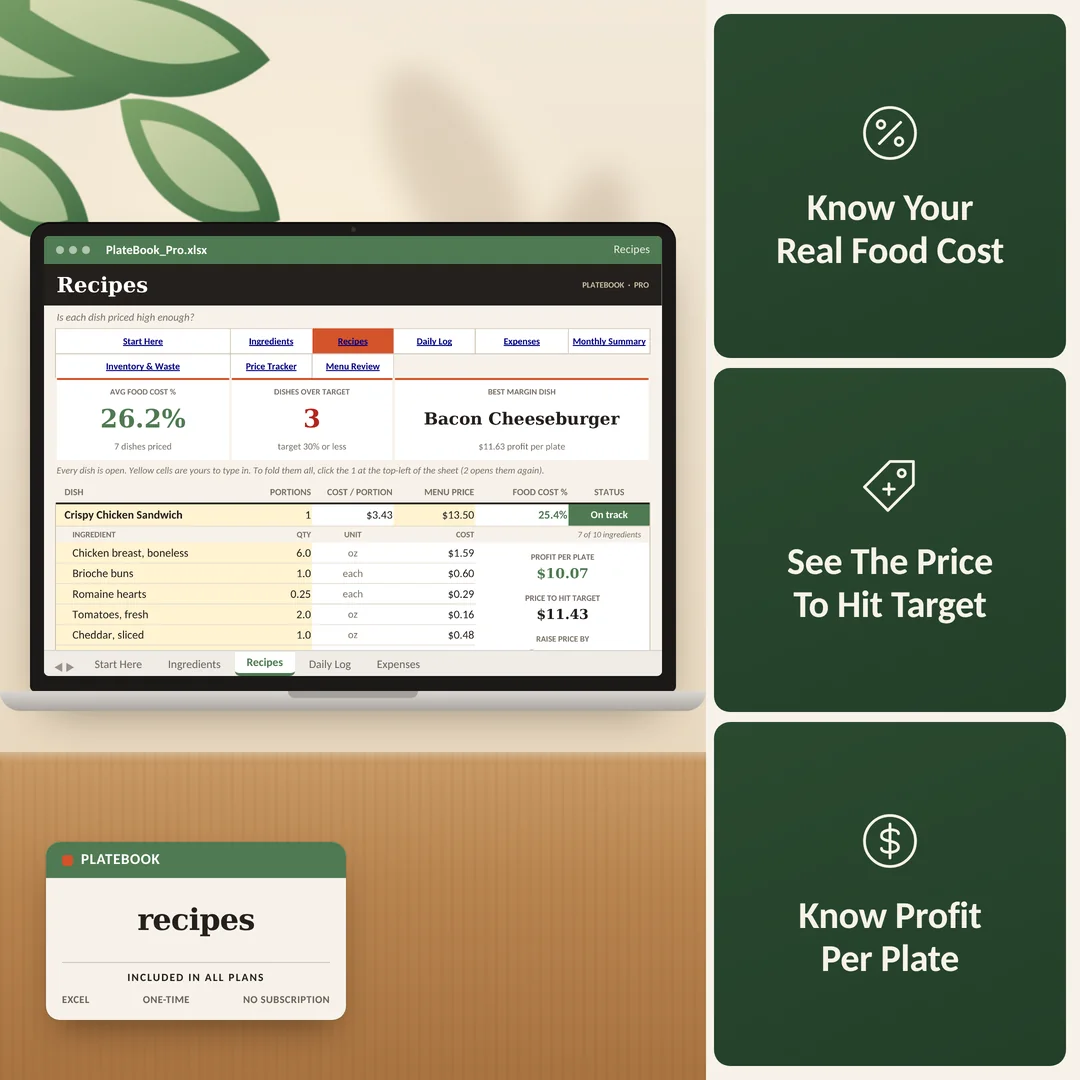
Type each ingredient the way you buy it, like $42.50 for a 10 lb case, then add it to a dish with the quantity you use. PlateBook works out the cost per portion, food cost % and profit per plate. Change an ingredient price and every dish that uses it updates automatically.
Three more tabs: Price Tracker (see which price jumps are eating your margin), Menu Review (find your Stars and Dogs, with labor % and prime cost %), and Inventory & Waste (stock value, reorder alerts and waste in dollars). Room grows to 100 dishes and 200 ingredients, and you get two bonus PDF guides.
Three more tabs: Locations (compare up to 4 locations or trucks side by side), Catering Quotes (per-head pricing, profit, deposits and balances), and Cash Flow Forecast (your next 12 months of cash). You also get two bonus Excel files, a Catering Proposal Template and a New Location Planner, and bigger daily and expense logs. The three paid add-ons are sold separately.
PlateBook is built for Microsoft Excel 2016 or newer (Windows or Mac), with no macros. It can open in Google Sheets, but some formatting and formulas may not display as intended. The bonus PDFs open on any device.
The real problem
You opened a restaurant because you’re great at food. But nobody told you that the food would be the easy part. The hard part is the numbers.
Right now, you’re pricing dishes by feel. You’re buying ingredients by habit. And every month, the bank account tells you what happened — after it’s already happened. That’s not running a business. That’s driving with your eyes closed.
PlateBook was built for exactly this moment. Not another POS system. Not another subscription that costs more than the problem it solves. Just the numbers, in Excel, that tell you whether you’re making money — or slowly losing it.
Five numbers that change everything
You can’t fix what you can’t see. PlateBook shows you the five numbers that separate the restaurants that last from the ones that close in year two.
Food Cost Per Dish
Know exactly what every plate costs you, down to the ounce of olive oil
Menu Price
Set prices that hit your target margin — not prices you copied from the place across the street
Waste & Reorders
See your stock value, what to reorder, and exactly what you threw away this month in dollars
Stars & Dogs
See which dishes make you money and which ones are popular but unprofitable
Labor & Prime Cost %
Check labor and prime cost against your targets every month, not after the payroll bill
What’s inside
PlateBook is a set of connected Excel workbooks. Enter your data once. Every number updates everywhere.
Recipes
Every dish open on one tab. See your cost per portion, food cost %, profit per plate and the exact price to hit your target. No formulas to write.
Ingredients
Type each item the way you buy it, like $42.50 for a 10 lb case. PlateBook works out the cost per unit and flags anything not used in a dish yet.
Daily Log & Expenses
One row per day for sales, food and labor. Log rent, utilities and other bills on Expenses. Everything feeds your profit automatically.
Monthly Summary
Pick a month. See revenue, food cost %, total costs and net profit, where your money went, and how this month compares with last.
Price Tracker
Enter the old and new price. See which increases are eating your margin, which dishes they hit hardest, and how food cost % moved.
Inventory & Waste
Count what’s on the shelf, see your stock value and what to reorder, and log what you threw away. Your top waste items show up in dollars.
Menu Review
Enter what you sold. Every dish becomes a Star, Plowhorse, Puzzle or Dog with a clear action, plus a menu map, labor % and prime cost %.
Locations
Compare up to 4 locations or trucks side by side: sales, food, labor, expenses and net profit. See who’s on top and who needs attention.
Catering Quotes
Quote each event per head, see profit and margin before you send it, then track deposits and the balance still to collect.
Cash Flow Forecast
See your cash in the bank month by month for the next 12 months. Spot your lowest point, and any month that dips below $0, before it happens.
How it works
Hour 1: Set up
Open the workbook and follow Start Here. Type in your top 10 ingredients and 5 best-selling dishes. PlateBook shows your food cost % on each one. Most owners are surprised by what they see.
Week 1: Price your menu
Compare your current menu prices to what PlateBook says they should be. Adjust the ones that are bleeding. One price change on one dish can be worth thousands a year.
Week 2: Start logging
Add one row a day to the Daily Log: sales, food and labor. Log your bills on Expenses. Two minutes a day, and your profit builds itself.
Week 3: Read your summary
Your Monthly Summary now has real data: food cost %, total costs, net profit and where your money went. You’re no longer guessing. You’re managing.
Month 2 and beyond
You update ingredient prices when invoices come in. On Pro and Complete, the Price Tracker, Menu Review and Inventory & Waste tabs tell you what to fix next. You catch problems in days, not months.
The right fit
PlateBook does one thing extremely well. Here’s who it’s built for, and who it’s not.
Built for you if…
Not the right fit if…
If the recipe costing is what you need most, start with Basic at $29.99 and use the 30-day refund window to see if it fits your workflow.
From PlateBook operators
My 'money maker' burger was costing me 42%. Repriced it, trimmed one ingredient, margin jumped to 31%. Paid for itself before the month was up.
Marcus T.
Smokestack BBQ · Tampa, FL
Sep 28, 2026
I was pricing catering jobs from gut feel. PlateBook showed me cost per head and margin before I hit send. Changed everything.
Priya S.
Saffron & Sage Catering · Plano, TX
Sep 26, 2026
Set it up on a Sunday. By Friday I had actual food cost data for the first time. My accountant asked what changed.
Jenna R.
Rosie's Diner · Columbus, OH
Sep 24, 2026
We didn't even know how much we were throwing out. One month of logging in PlateBook and we fixed it.
Danielle M.
Fork & Flame · Raleigh, NC
Sep 22, 2026
Setup took a weekend but once it was in, the numbers were instant. Worth every minute.
Rachel K.
Peaks Café · Denver, CO
Sep 21, 2026
PlateBook showed me which menu items were actually losing money. Dropped one, repriced two. Done.
Carlos B.
El Rey Taco Truck · Austin, TX
Sep 19, 2026
"My 'money maker' burger was costing me 42%. Repriced it, trimmed one ingredient, margin jumped to 31%. Paid for itself before the month was up."
Marcus T.
Smokestack BBQ · Tampa, FL
The PlateBook promise
Compare plans
Every plan is a one-time payment. No monthly fees. No subscriptions. If you outgrow your tier, you can upgrade for less than the price difference.
| What’s included | Basic Start here $29.99 $49.99 | Pro Full kitchen control Most Popular$49.99 $79.99 | Complete Every number covered Best Value$89.99 $119.99 |
|---|---|---|---|
| Recipes: cost per portion, food cost %, profit per plate, price to hit target | |||
| Ingredients: type items the way you buy them, cost per unit done for you | |||
| Daily Log and Expenses tabs | |||
| Monthly Summary: revenue, costs, net profit, 6-month chart | |||
| Room for 25 dishes / 60 ingredients | — | — | |
| Room for 100 dishes / 200 ingredients | — | ||
| Price Tracker: price jumps and the dishes they hurt | — | ||
| Inventory & Waste: stock value, reorder alerts, top waste items | — | ||
| Menu Review: stars, dogs, menu map, labor and prime cost % | — | ||
| 3 free bonuses: Inventory & Waste Count Kit (PDF), Menu Price Increase Playbook (PDF), Menu Engineering Worksheet (Excel) | — | ||
| Locations: compare up to 4 locations or trucks side by side | — | — | |
| Catering Quotes: per-head pricing, deposits and balances | — | — | |
| Cash Flow Forecast: your next 12 months of cash | — | — | |
| 2 additional bonuses: Catering Proposal Template (Excel) and New Location Planner (Excel) | — | — | |
| Bigger logs: 2,200 daily rows and 1,200 expense rows | — | — |
Optional add-ons at checkout: Staff Scheduler & Labor Planner (Excel) ($14.99), Vendor Bills & Payables Tracker (Excel) ($9.99), Food Safety & Compliance Kit (Excel) ($9.99).
Start today
Open PlateBook before you place your next order. Enter your top 5 dishes. See exactly what they cost you. One price fix on one dish can pay for PlateBook ten times over. One payment, and the tools are yours to keep.
Still deciding?
Restaurants, food trucks, ghost kitchens, caterers, bakeries, juice bars, cafés — any US food business that buys ingredients and sells dishes. If you have a menu and a food cost, PlateBook is built for you.
Your POS tells you what you sold. PlateBook tells you what it cost you to make it. Most POS systems don’t do recipe costing, ingredient price tracking, or waste tracking. PlateBook fills that gap — and it’s a one-time purchase, not another $200/month subscription.
PlateBook is built for Microsoft Excel 2016 or newer (Windows, Mac, or Microsoft 365 online). It can open in Google Sheets, but some formatting and formulas may not display the same way, so Excel is the recommended way to use it.
About an hour for Basic. Enter your top ingredients and your best-selling recipes. The Start Here tab walks you through it in five steps, and the sample data shows how every tab works. Most owners have their first food cost % within the first hour.
Basic gives you recipe costing, a daily log, expenses and a monthly profit summary, with room for 25 dishes. Pro adds the Price Tracker, Menu Review and Inventory & Waste tabs, with room for 100 dishes, plus three free bonus files. Complete adds Locations (up to 4), Catering Quotes and a 12-month Cash Flow Forecast, plus two more bonus Excel files — five free bonuses in total — and bigger logs.
Yes. You type numbers into yellow cells. PlateBook does the math. The Start Here tab walks you through setup in five steps, and every workbook comes with sample data so you can see how each tab works before you enter your own. If you can enter a number in a cell, you can use PlateBook.
As accurate as your ingredient prices. PlateBook calculates cost per unit from the way you buy each ingredient and totals every ingredient in the recipe. Keep your prices up to date and the numbers stay right.
You can share the files with the people who run your kitchen. Print any tab you want for the line. Please don’t share the files or download links with other businesses.
If you add it at checkout, you get updated versions of the files you bought (bug fixes, new features, new sheets) sent to you at no extra charge for as long as we offer your plan, plus front-of-the-line email support. It doesn’t include custom work or new products. See our Terms of Service for details.
Yes. Payment is handled by Whop, a third-party payment platform, right on our checkout page. Your card details go straight to them and never touch our servers. Everything is priced and charged in US dollars.
Your download links appear on the confirmation page the moment your payment goes through. Download your files right there and bookmark the page so you can come back to it. If anything doesn’t open, email us and we’ll get you sorted.
Try it for a few weeks. If PlateBook doesn’t give you a clearer picture of your food cost and margins than what you’re using now, email us within 30 days for a full refund under our Refund Policy.
One-time purchase · 30-day money-back guarantee
PlateBook Pro
30-day guarantee · Instant download · No subscription
Free instant delivery — download right after checkout
Your cart is empty